 Elospeed StemMaker
Turn your MP3s into
Traktor Stems
StemMaker splits a track into drums, bass, melody and vocals and saves it as a ready-to-play .stem.mp4 for Traktor. One small Windows program, free and open source: no Python, no PyTorch, no graphics drivers, nothing to set up.
- Free & MIT licensed
- Windows 10 / 11
- No Python, no graphics card
- Runs locally on your PC
- Whole folders in one go
- Up to 320 kbit/s
See it in action
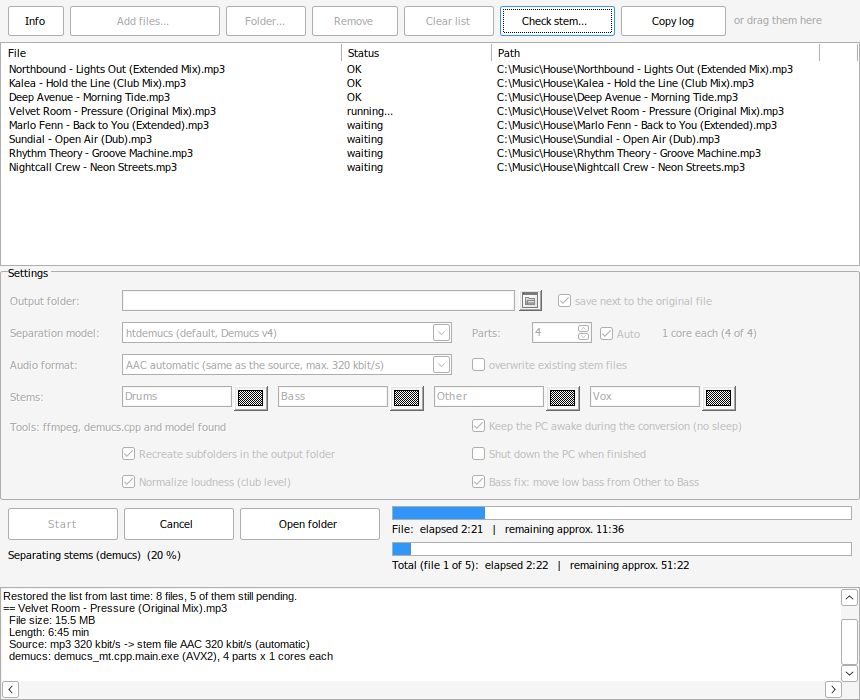
From an MP3 to a Traktor stem file, then a listen in the StemPlayer: mute, solo, A/B with the original and fader. Sound on!
Everything you need, nothing to install
Unzip, start, drag your music in. On the first start StemMaker downloads ffmpeg and the separation model by itself.
Four real stems
Drums, Bass, Other (melody) and Vox, plus the original as master track, in the format Traktor expects. Names and colours are adjustable.
Quality on par with Traktor
Uses the open-source Demucs v4 model (htdemucs). In a side-by-side test against a stem file made by Traktor Pro 4, drums, vocals and level came out practically the same. Three models to pick from: htdemucs_ft for the best quality, Demucs v3 when you want it quicker.
Built for whole collections
Add complete folders, see a time estimate before you start, let it run overnight. The list is saved after every file, so a crash or a power cut costs you one track, not the run. In our own stress test 400 files in nested folders came out complete, even after cancelling and killing the program in between, with the folder tree rebuilt one to one.
Tags and cover art kept
Title, artist, album, genre, year, track number, BPM, key, label and cover are copied from your MP3, so the stem file looks right in your Traktor collection.
Native, not a Python setup
The whole program is a 4 MB Windows exe, the separation engine is C++ (demucs.cpp) instead of Python and PyTorch. Nothing to install, nothing in the background, no account and no cloud. Starts in a second and your music never leaves the PC.
Club level and bass fix
Quiet files are raised to club level without a limiter, so the stem waveforms are easy to read and a stem does not drop in volume when you bring it into your set. Low bass that the model leaves in the melody stem is moved into the bass stem, like Traktor does, so the kick and bass stay solid.
Plays nicely with your PC
Picks the fastest build for your processor (AVX2, AVX or generic), keeps the PC awake during long runs and can shut it down when done.
How it works
Three steps from your own music file to a stem file you can load in Traktor.
- Download and unzipGet the ZIP from GitHub and unzip it anywhere, for example to
C:\Tools\StemMaker. No installer, no admin rights. - Drag your music inDrop MP3, WAV, FLAC, AIFF, M4A or OGG files or whole folders into the window, then click Start.
- Load it in TraktorEach track becomes
Title.stem.mp4next to the original or in a folder of your choice. Load it into a stem deck and play.
What you don't have to do
Most stem separators are command-line tools. Getting them to run is usually the hard part, and the result is four loose files.
- No Python environment, no PyTorch, no CUDA drivers and no version conflicts to untangle
- No graphics card: separation runs on the processor of any 64-bit Windows PC
- No routing by hand: the four stems and the original mix land in one
.stem.mp4, ready for a stem deck - No paid extra software to build the Traktor container, and no Traktor licence to convert
- No track-by-track clicking: point StemMaker at a folder and come back later
- No test import: the included StemPlayer tells you whether the separation worked
Listen before you play
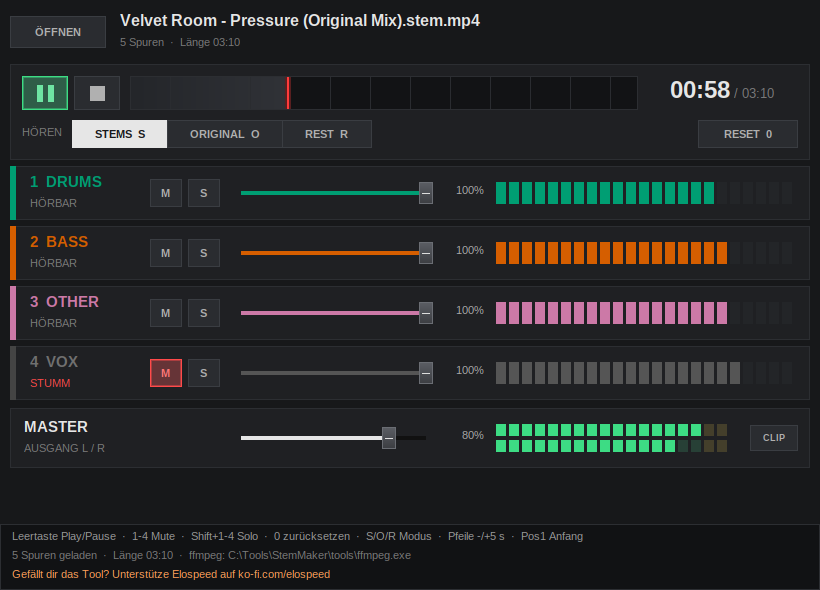
The included StemPlayer add-on lets you check a finished stem file without importing it into Traktor first.
- Mute, solo and volume for every stem, with level meters
- A/B comparison with the original mix
- “Rest” mode shows what the separation left out
- Opens by drag & drop or straight from StemMaker
Honest about speed
Separation runs on the processor only, so it takes a while. In return it works on almost any Windows PC and never uploads your music anywhere.
- Current PC: htdemucs takes about twice the song length, Demucs v3 about the song length
- htdemucs_ft (best quality) is about four times slower than htdemucs
- StemMaker learns the speed of your PC and shows how long the list will take
| Computer | htdemucs (default) | Demucs v3 |
|---|---|---|
| Intel i7-12700KF (2021) | approx. 7–8 min | approx. 4 min |
| Intel i5-2500 (2011) | approx. 27 min | approx. 13 min |
Questions and answers
Is StemMaker really free?
Yes. StemMaker is open source under the MIT licence. There are no ads, no account and no paid version. If you like it, you can leave a voluntary donation on Ko-fi.
Which Traktor versions can play the stem files?
The files follow the open NI stem format (an MP4 with master plus four stems and stem metadata), the same way Stemgen builds them. They have been tested in Traktor Pro 4. Any software that reads .stem.mp4 should work.
Do I need a graphics card or Python?
No. StemMaker is a single Windows program with the separation engine built in as C++ code (demucs.cpp), so there is no Python environment, no PyTorch and no CUDA driver to install and nothing that can conflict with other software on your PC. It runs on the processor. You need a 64-bit Windows 10 or 11 and an internet connection on the first start for the downloads (ffmpeg approx. 56 MB, model 81 MB).
Windows shows “Windows protected your PC”. Is that a problem?
StemMaker is not digitally signed, because signing certificates cost money every year. Click “More info” and then “Run anyway”. The full source code is on GitHub, and you can check the download on VirusTotal or build it yourself.
How good is the separation?
In our test against a stem file made by Traktor Pro 4 from the same track, StemMaker came out about level: drums, kick and vocals sounded nearly identical. Paid tools like RipX or Lalal.ai and special models in UVR5 separate even more cleanly. When you solo a stem you can sometimes hear small artifacts, as with every tool of this kind.
Traktor Pro 4 can make stems itself. Why StemMaker?
Honestly: Traktor 4 is faster per track, and if its own separation works for you, you don't need StemMaker. Traktor keeps its stems inside its own collection, though: in its Stems folder, with hashed file names, linked to the original track. StemMaker writes standalone .stem.mp4 files with readable names next to your music, so you can copy them to another laptop or a USB stick and use them with any software that reads .stem.mp4. It works through complete folders on its own, for example overnight, shows the expected time beforehand and continues after a stop or power cut. You don't need a Traktor licence for it, and it raises quiet files to club level, so the waveforms are easy to read.
Are tags and cover art carried over?
Yes: title, artist, album, genre, year, track number, BPM, key, label, ISRC and the cover are copied from the source file, so the stem file looks right in your collection straight away. Traktor replaces BPM and key with its own analysis anyway; until then, and in other programs, the values from your file are shown.
What music can I use?
StemMaker is a tool for music you own, for example tracks you bought or your own productions. Please respect the rights of the artists and only use the stem files for your own purposes.
Is there a command line version?
Yes, AddOns\StemCLI.exe does the same without a window, for batch files or the Windows Task Scheduler.
Ready to make your own stems?
Download the ZIP, unzip it and drag in your first track.